
Reading a card
Each opportunity gets one card. Everything Winmantle knows about it is on the card or one click away.
Availability: Available on every Winmantle desk in the private pilot.
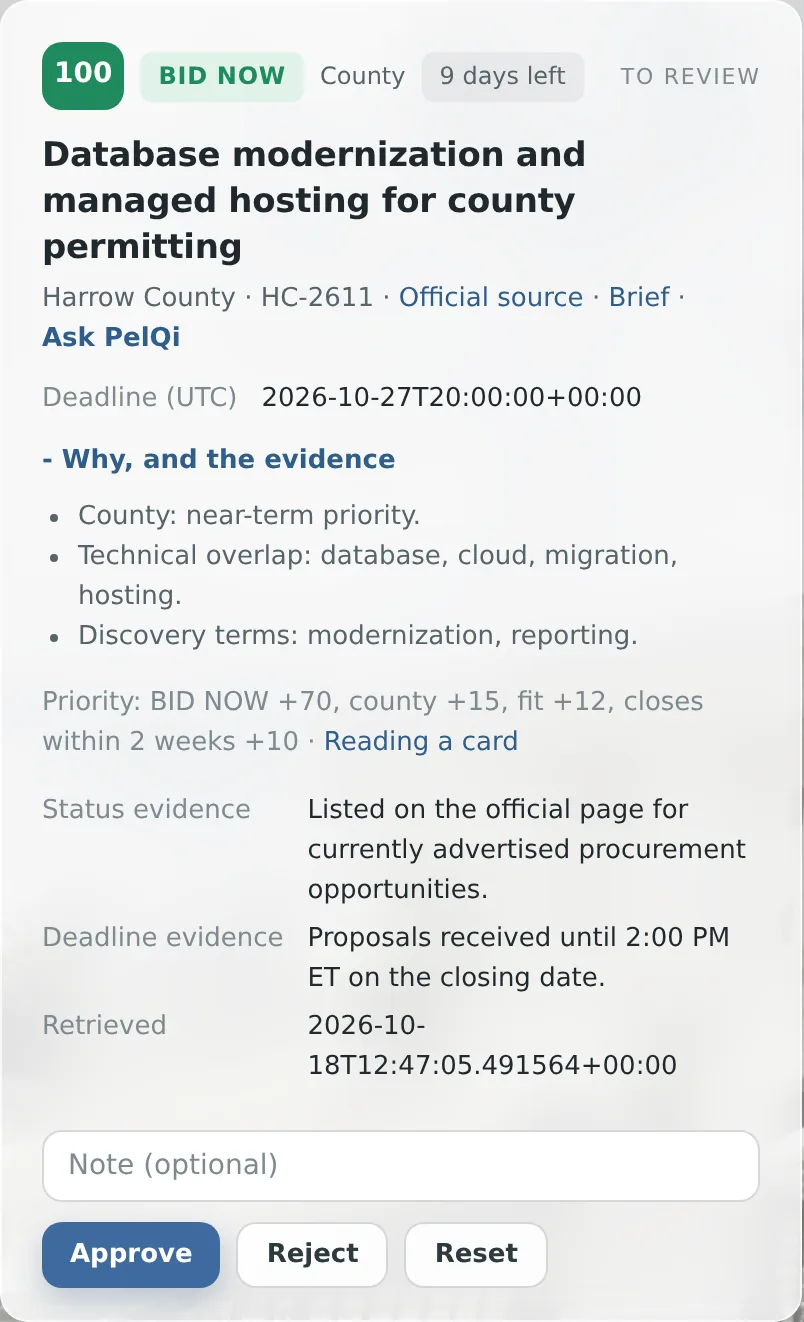
- The number
- Priority from 0 to 100. Rest the pointer on it for the breakdown. See How priority is scored
- The recommendation
- BID NOW, PREPARE, TEAM/SUB, WATCH, APPLY, VERIFY and others. See Government recommendations and Commercial recommendations
- Level or kind
- State agency, Local government, County, Education or Federal for government work; Contract opening or Capture for the other lanes
- Days left
- Time to the deadline. Seven days or fewer shows in red. No closing date means the source gives none
- State
- To review, Approved or Rejected
- Title line
- Buyer or employer, the source reference, Official source, Brief and Ask PelQi
- Terms and rate
- Commercial openings only: the contract terms and rate as stated on the opening
- Deadline (UTC)
- The deadline in UTC, taken from the source, or None published
- Why, and the evidence
- Opens the reasons, the priority breakdown and the evidence. See The evidence behind a card
- Note and buttons
- An optional note, then Approve, Reject and Reset
What it can and cannot do
It can
- Show the score, recommendation, deadline, evidence and decision on one card
It cannot
- Show the full notice text: open the official source for that
Related articles
- The evidence behind a cardWhy, and the evidence lists the reasons, blockers, priority breakdown and the source evidence with its retrieval time.
- Approve an opportunityApprove puts an item in the export and the capture log. It is only offered when nothing blocks it.
- How priority is scoredPriority runs from 0 to 100: the recommendation sets the base, then level, fit and time left adjust it.
Still stuck? Contact support, or browse all articles.