
Read the coverage table
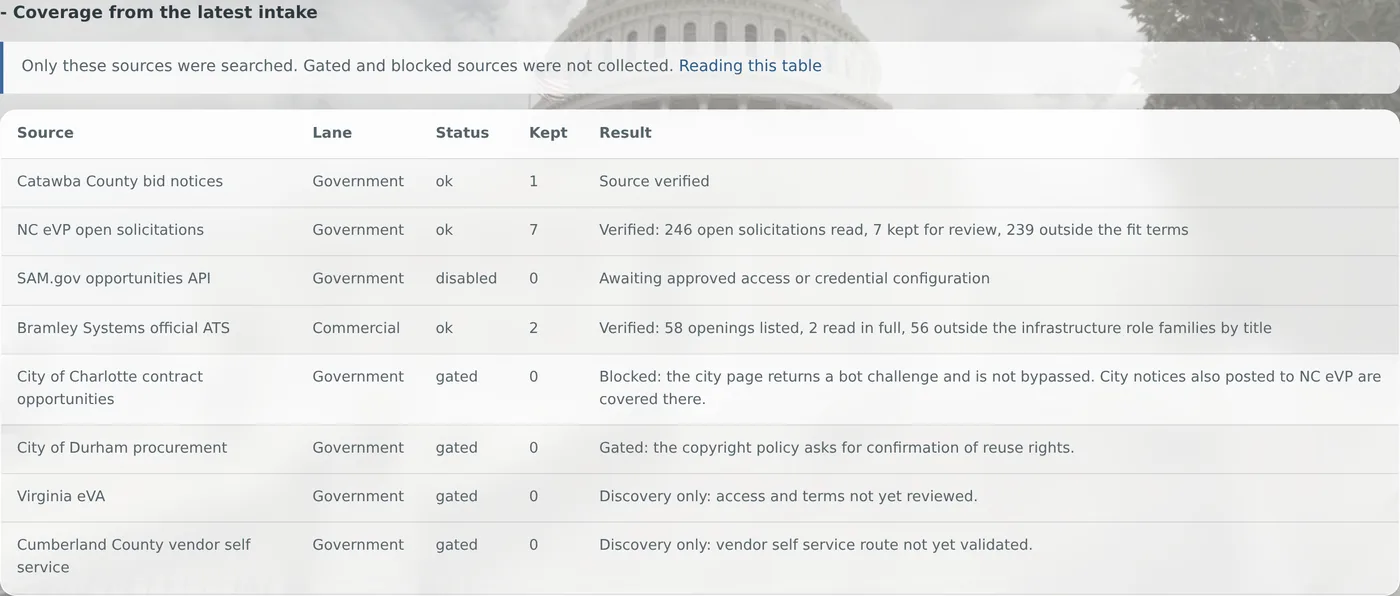
An empty result can mean nothing new, or a source that did not work. The coverage table tells you which.
Availability: Available on every Winmantle desk in the private pilot.
Steps
- Scroll to the bottom of the desk
- Press Coverage from the latest intake
- Read each row: source, lane, status, how many items were kept, and the result
What you should see
Every source the run looked at, including those held back, with a plain result such as 246 open solicitations read, 7 kept for review, 239 outside the fit terms.
What it can and cannot do
It can
- Show every source the last run looked at, with what it kept
It cannot
- Show older runs: only the latest is listed
Related articles
- What each source status meansok, failed, disabled and gated: what each status in the coverage table means and what to do.
- Sources held backSources reviewed but not collected, with the reason, shown on every run so a gap never hides.
Still stuck? Contact support, or browse all articles.