
Ask about one item
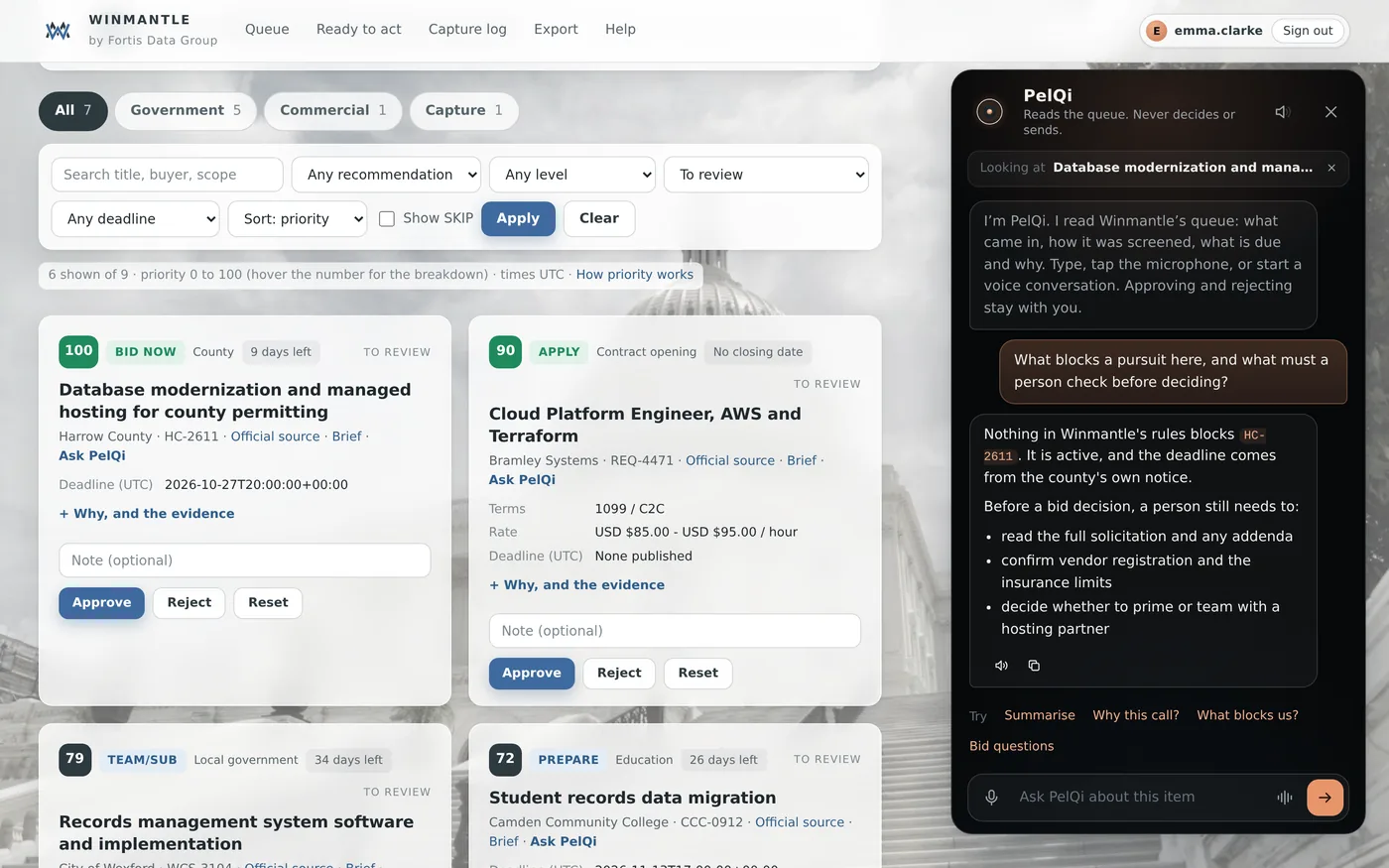
Asking about one item gives PelQi that card's screening and evidence in full.
Availability: Available on every Winmantle desk in the private pilot.
Steps
- On a card, press Ask PelQi, or on a brief press Ask PelQi about this
- Tap Summarise, Why this call?, What blocks us? or Bid questions, or type a question
- To go back to the whole queue, press Looking at at the top of the panel
What you should see
Looking at shows the item's title, and a divider in the thread marks the change of subject.
What it can and cannot do
It can
- Answer from one card's full screening and evidence
It cannot
- Read the attached notice documents
If it does not work
- That item is no longer in the queue: reload the page. See That item is no longer in the queue.
Related articles
- Ask about the whole queueAsk what to look at first, what closes soon or which items fit best. PelQi answers from the queue and cites references.
- Open, copy or download a briefBrief on any card opens a capture brief you can copy, or download as Markdown for your wiki.
Still stuck? Contact support, or browse all articles.