
The capture log
The capture log is the record of what you decided and why.
Availability: Available on every Winmantle desk in the private pilot.
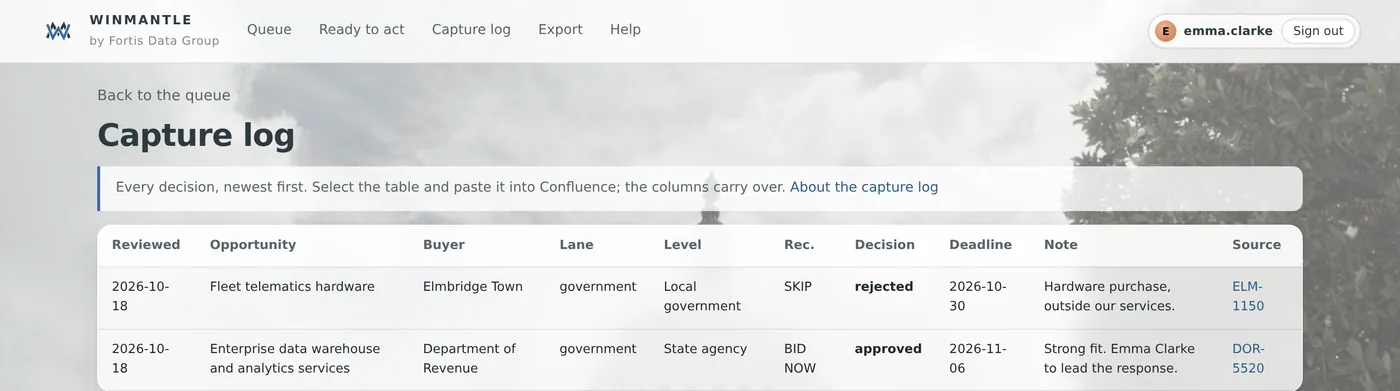
Steps
- Choose Capture log in the menu
- Read down the table, newest first
- To keep a copy, select the table and paste it into Confluence or a spreadsheet
What you should see
Columns: Reviewed, Opportunity, Buyer, Lane, Level, Rec., Decision, Deadline, Note and Source. Items with a note but no decision appear too. No decisions yet means nothing has been decided.
What it can and cannot do
It can
- Show every decision newest first, ready to paste into a wiki
It cannot
- Sync to Confluence or another wiki automatically
Related articles
- Export approved work as CSVExport downloads reviewed-opportunities.csv with every approved item, ready to import into your CRM.
- Add a note to a decisionAn optional note of up to 2,000 characters is saved with each decision and shown in the log and export.
- Confluence and other wikisPaste the capture log table, or upload a brief's Markdown file. There is no automatic sync.
Still stuck? Contact support, or browse all articles.