
Open, copy or download a brief
A brief is the write-up for one opportunity: the facts, the evidence, a checklist and the next step. It is built from the card's own record. No model writes it, and nothing is sent.
Availability: Available on every Winmantle desk in the private pilot.
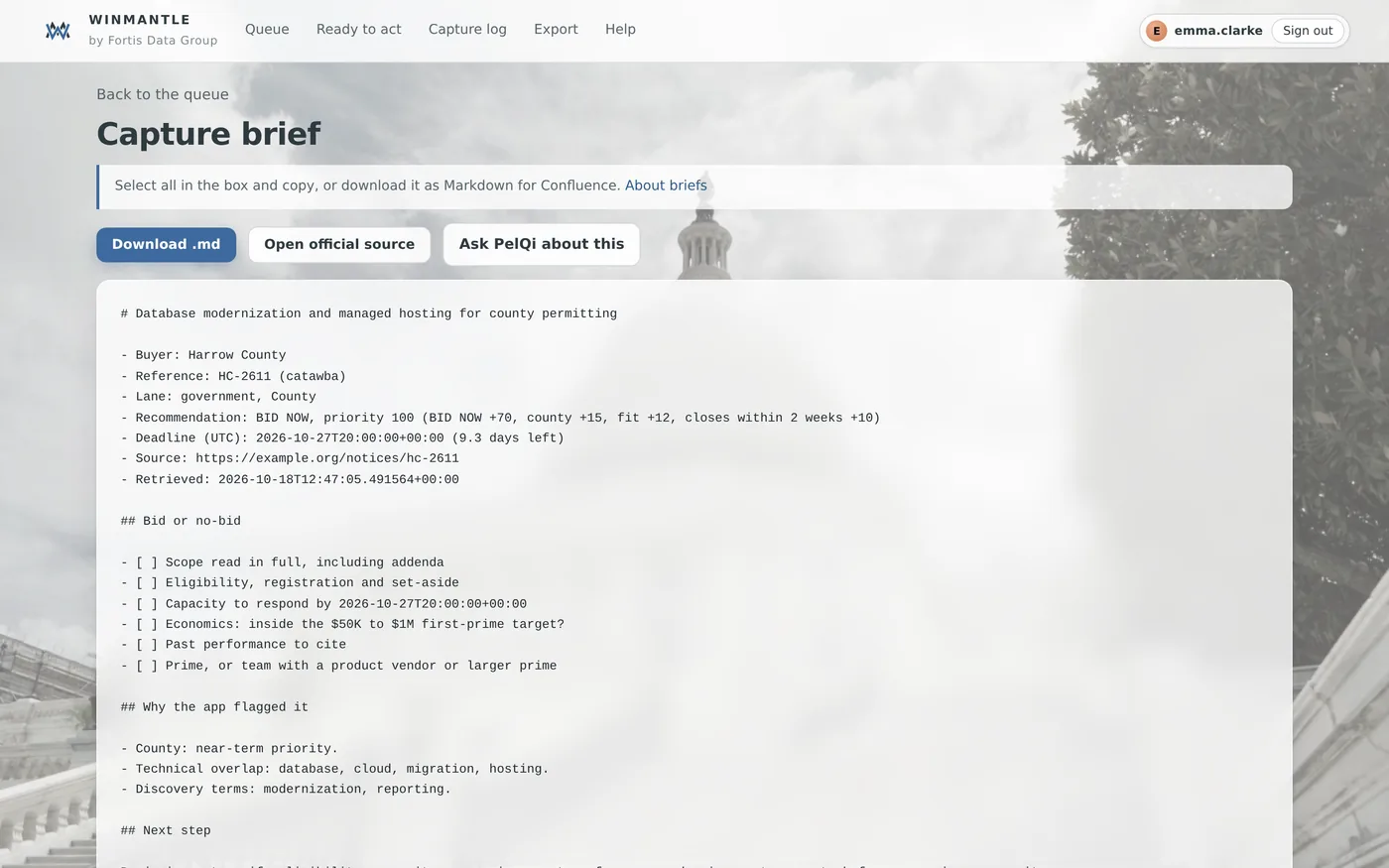
Steps
- On a card, press Brief
- Select all the text in the box and copy it, or press Download .md
- Press Open official source to check the notice, or Ask PelQi about this for questions
- Press Back to the queue to return to the same card
What you should see
A file named brief- followed by the item's reference and .md, which pastes cleanly into Confluence and most wikis.
What it can and cannot do
It can
- Write a brief from the card's own record, ready to copy or download
It cannot
- Use a model or send anything: briefs are built on the desk
Related articles
- What a brief containsEvery brief has the facts, the reasons and the next step; each lane adds its own checklist.
- Confluence and other wikisPaste the capture log table, or upload a brief's Markdown file. There is no automatic sync.
- Ask about one itemAsk PelQi on a card or a brief asks about that item only, with its full evidence.
Still stuck? Contact support, or browse all articles.