
Ask about the whole queue
With Looking at: The whole queue, PelQi sees the open items, how they were screened, the latest coverage and the last intake time.
Availability: Available on every Winmantle desk in the private pilot.
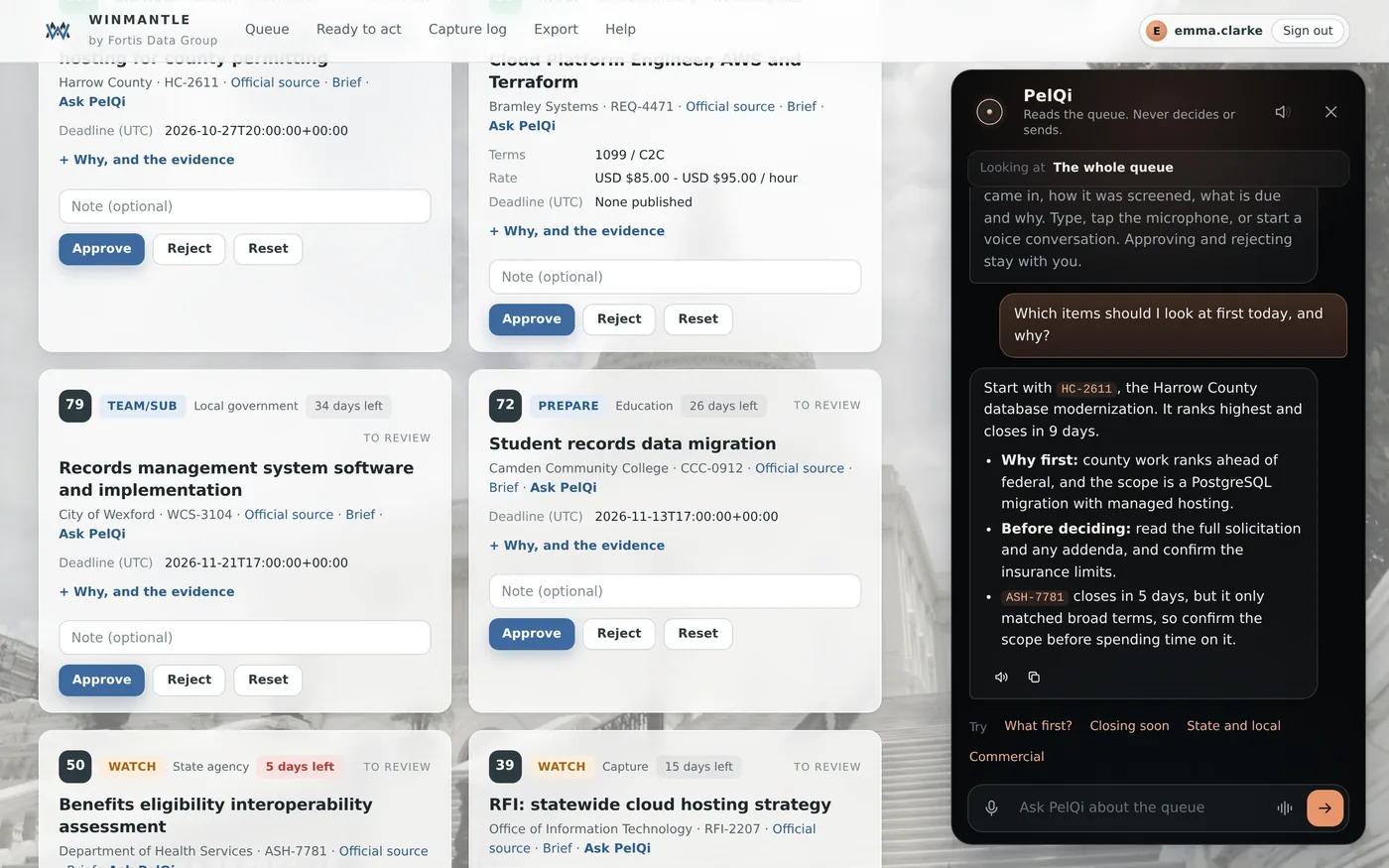
Steps
- Open PelQi
- Tap What first?, Closing soon, State and local or Commercial, or type your own question
- Read the answer. References in it match the cards
What you should see
An answer that names items by their reference, so you can find the card. Under it, Read aloud and Copy.
What it can and cannot do
It can
- Answer from up to 40 open items, the latest coverage and the last intake time
- Name items by their reference so you can check them
It cannot
- Read the web or anything Winmantle did not collect
- Act on what it says
If it does not work
- A line Not in the queue, treat with care lists references PelQi named that Winmantle cannot find. Check those yourself.
- Other messages: see PelQi did not answer.
Related articles
- Follow-up questionsPelQi remembers the last two questions and answers in the panel, so you can ask a follow-up.
- Ask about one itemAsk PelQi on a card or a brief asks about that item only, with its full evidence.
- Question limitsOne question every few seconds, and 200 questions a day for each desk.
Still stuck? Contact support, or browse all articles.